亞拓遙控世界討論區

標題: 野獸+韌體程式 V4.2.0 開放更新了 [打印本頁]

作者: patrick053    時間: 2016-8-26 23:52
標題: 野獸+韌體程式 V4.2.0 開放更新了
野獸+ V4.2.0 開放更新了
此次更新內容如下

4.2.0
Basic functionality
modified flight parameters and gain settings on cyclics according to our team pilots, giving and more stable and precise control
limited function of control loop when heli is standing on the ground to prevent from swash showing weird movent and prevent from tilting of the heli by accident during take off
Internal RPM Governor
softstart can be disabled using StudioX for use with ESC that have built in softstart, i.e. Castle Creations ESC in "External Governor Mode", ALIGN RCE-BL ESCs in "Heli linear mode/Heli mode 1" or other ESC with softstart (but no governor!)
Added governor rpm display when switching into idle up showing the set rpm and actual rpm, giving a better clue to see if TX is setup correctly and what rpm the system is sensing (see: Governor usage)
AttitudeControl
added vibration detection to prevent from using wrong sensor information when vibrations are disturbing the sensors (this can lead to AttitudeControl not leveling super accurate anymore, especially after a few flight minutes doing 3D flight and FFF, but should be accurate enough for leveling and saving the heli in case of emergency)
modified stopping curve and stick fading when AttitudeControl is enabled; gives more precise stick control and more smooth heli movement; no more servo jumping during bench test
modifiable stick angle in StudioX Expert Parameters for Flight trainer mode no acts as hard angular limit.


Patrick


作者: woody0116    時間: 2016-8-27 05:58
這要錢嗎?
作者: patrick053    時間: 2016-8-27 09:45
除了救機版以外
其他版本免費


Patrick
作者: lliu0130    時間: 2016-8-27 16:30
太好了,這次700X, 就用4.2版試機
作者: IHL    時間: 2016-8-27 21:23
感謝分享!
作者: fiero_tw    時間: 2016-8-27 21:49
派大這太讚了
作者: lliu0130    時間: 2016-8-30 09:30
本帖最後由 lliu0130 於 2016-8-30 15:30 編輯

定速是原來一般版就有的功能了,

主要是改進下列幾項,

1. 控制更精準, 穩定.
2. 在離地前機身能穩定, 不會有側倒問題.
3. 內部緩起動在搭配外部定速時可用StudioX取消.
4. 救機主要是加了震動偵測功能, 在不同姿態,依然能正確判斷機體姿態而正確的救機, 並讓救機控制能更精準及平順穩定

作者: 0925133557    時間: 2016-8-30 10:22
請問一下,這要如何更新?要傳輸線嗎?
作者: lliu0130    時間: 2016-8-30 11:48
本帖最後由 lliu0130 於 2016-8-30 13:55 編輯
0925133557 發表於 2016-8-30 10:22
請問一下,這要如何更新?要傳輸線嗎?
韌體更新的功能可參考這裡, 中間有一個 Firmware version available 可展開有說明.
http://wiki.beastx.com/index.php/BEASTX_Devices/en


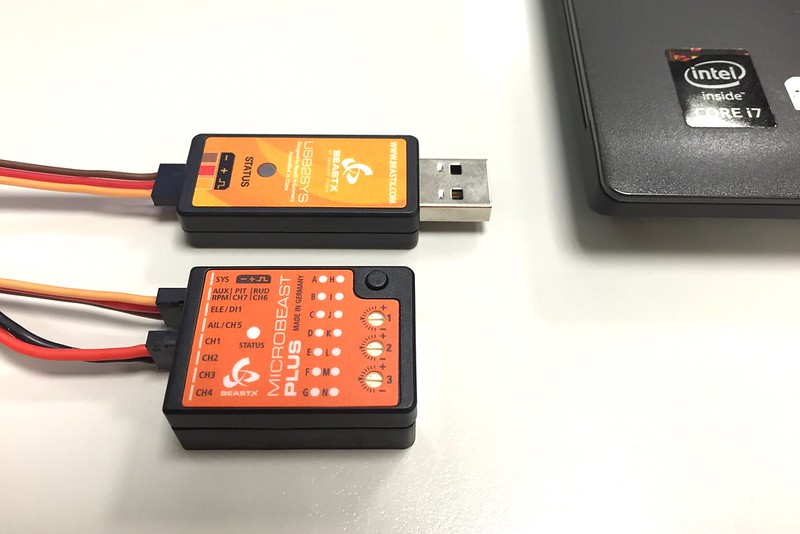
野獸更新要另購專用 USB, 接到 SYS 端口,
並至 Microbeast 官網下載 StudioX 程式

1.野獸送BEC電力
2.StudioX啟動
3.USB接上電腦, 照片中, 專用USB 是接到野獸+ 的 SYS 端口. 而紅黑那條是BEC供電


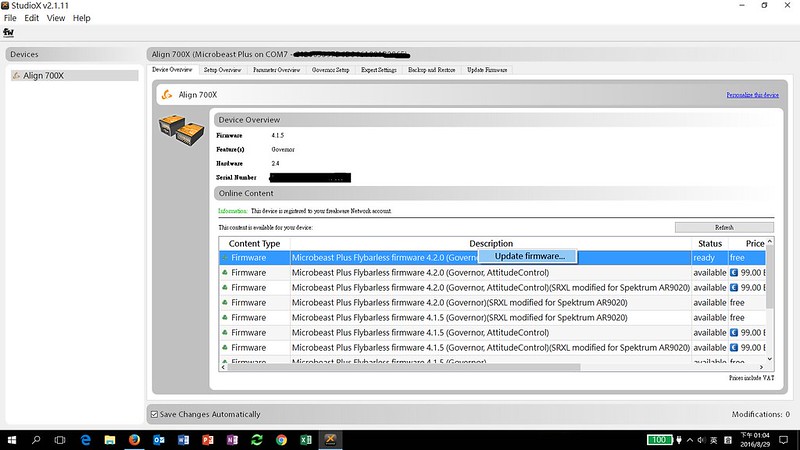
4.第一次使用StudioX, 先建立帳號 (Email, 密碼), 註冊你的MB+(只要按下 register 按鈕, 很快)
5.接下來會列出可昇級的韌體.
6.選擇你要更新的韌體, 第一次是提出請求(Request) , 這時StudioX會下載更新韌體.
7.完成後, 再選擇一次會更新韌體 (update firmware) , 就會上載至MB+
8.建議新韌體更新完要設定重置再重新設定一次. (重置方式: 在設定模式下,亮A功能時, 按下鈕不放10秒,直到A-N來回燈號閃一次).


作者: FINFIN    時間: 2016-8-30 15:21
感謝更新的教學~~~還蠻清楚的!!!
作者: patrick053    時間: 2016-8-30 17:51
川大出品
必屬佳作啦
絕對讚的啦
同場加映升級後會顯示轉速
不過一個燈號就 250 轉
似乎有點大
1.jpg


Patrick
作者: ccf    時間: 2017-4-9 22:07
lliu0130 發表於 2016-8-30 11:48
韌體更新的功能可參考這裡, 中間有一個 Firmware version available 可展開有說明.
http://wiki.beastx.com ...

請問前輩,上面是寫自平要99歐元嗎?

作者: patrick053    時間: 2017-4-9 23:29
ccf 發表於 2017-4-9 22:07
請問前輩,上面是寫自平要99歐元嗎?

自平要99歐元沒錯喔

Patrick


歡迎光臨 亞拓遙控世界討論區 (https://forum.align.com.tw/) Powered by Discuz! X2.5